Where the time goes
A flaky test spends time in three ways:
- The retry. The failed attempt ran until it failed - often until a timeout - and the retry runs the whole test again.
- The red run. When a test fails on every attempt, all of them were spent, and the run is often started again in full.
- The wait. A longer pipeline holds up the merge, the review and the next deploy.
The first two can be counted from the test results. The third depends on how your team works; it comes back in the worked example below.
Squally's Overview has a Where the time goes card: the tests whose retries and failures cost the most in the period.
How time lost is counted
There are two reasonable ways to count, and they answer different questions:
- Attempts a retry replaced. Every attempt that was followed by another attempt of the same test, at its real duration. The final attempt never counts, whether it passed or failed. This is what the retries cost.
- Attempts that did not count. For a failed run every attempt, for a flaky run the attempts before the pass. This also counts a test that fails on all its retries, so a test that is broken shows up as well.
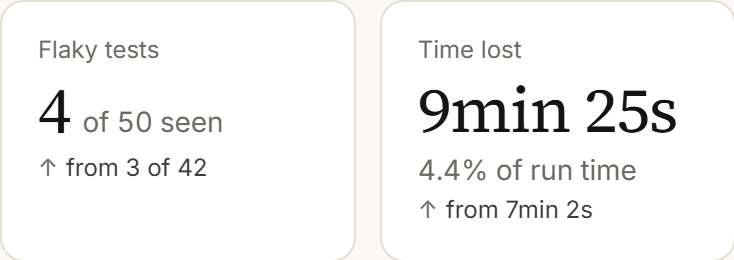
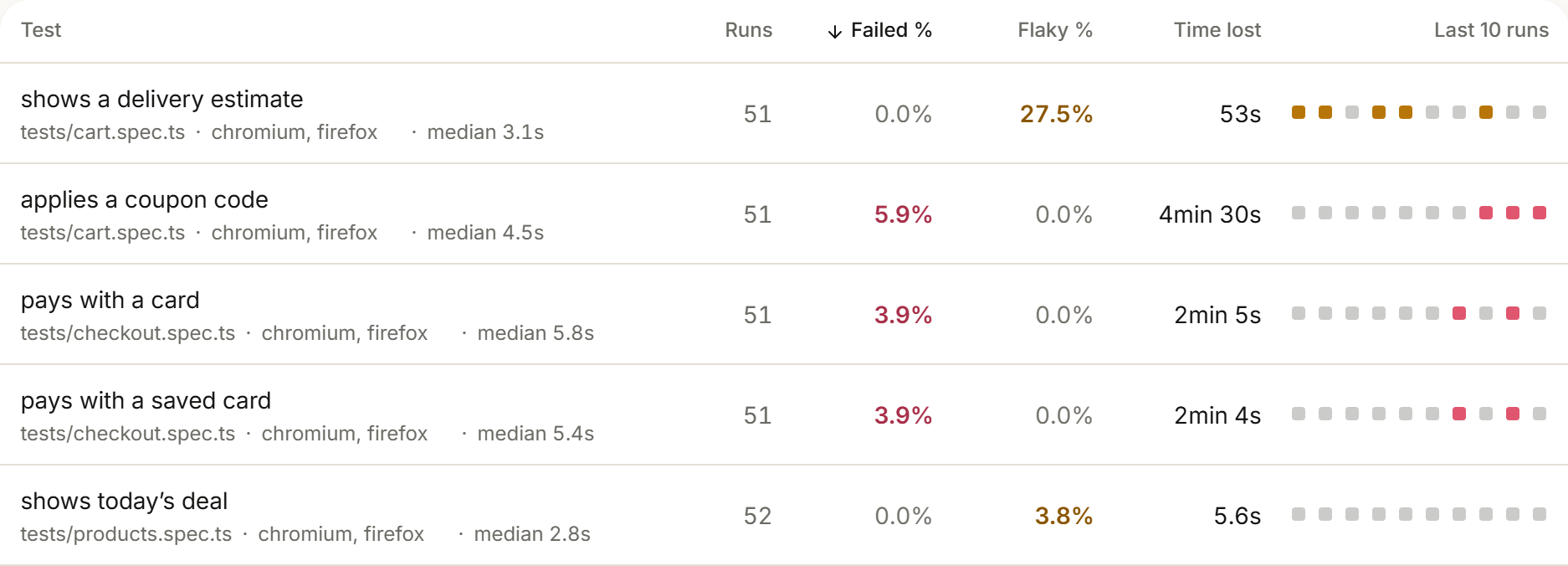
Squally uses both. The Overview's Time lost tile counts the attempts a retry replaced. The Test explorer's Time lost column and a test's own page count the attempts that did not count, each at the duration of the test's final attempt. Added up over all tests, the column does not equal the tile.
An example, with every attempt taking 40 seconds and two retries allowed:
- A flaky run - fails once, passes on the first retry: both counts give 40 seconds.
- A failed run - fails on all three attempts: the tile counts the two attempts that were retried, 80 seconds; the column counts all three, 120 seconds.
The two also differ in which runs they include. The tile and the Where the time goes card count every run, including runs where most of the suite failed at once. The per-test column leaves those runs out, as every per-test figure does.
As a share of run time
Minutes on their own are hard to judge. Ten minutes in a month is a lot for a suite that runs an hour a month and very little for one that runs a hundred. Divide time lost by the run time of the same runs.
The Time lost tile does that: below the time it shows the share of run time. The run time is the CI time the runs used - for a sharded run, the time of all its shards added up.
Turning minutes into money
Squally reports time, not money. The conversion is yours to make: what a minute of CI and a minute of waiting are worth differs from team to team, and you have the figures.
A worked example for one week, in minutes:
- Time lost to retries and failed attempts: 45 minutes of CI time.
- Runs that went red on a flaky test and were started again: 6, at 12 minutes each - 72 minutes of CI time.
- Each of those re-runs kept one developer waiting for its 12 minutes: 72 minutes of waiting.
- In total: 117 minutes of CI time and 72 minutes of waiting in one week.
Multiply the CI minutes by what your CI provider bills for a minute, and the waiting by what an hour of your team's time is worth to you. Keep the two apart: CI minutes are on an invoice, waiting time is not, but it is the part people notice.
Start with the test that costs the most
Sort by time lost, not by how often a test flakes. A test that flakes in 2% of runs but times out after 30 seconds each time costs more than one that flakes in 20% of runs and fails within a second.
In Squally, the Test explorer sorts by its Time lost column, highest first, and the Overview's Time lost tile links there.
Then fix it: Fixing flaky Playwright tests: causes and patterns.
Watching it over time
Time lost moves with the suite: new tests, slower runners, a dependency that got slower. Look at it per period and compare with the period before; one week says little.
The Overview shows the last 30 days unless you choose 7, 14 or 90, and each tile compares with the period before of the same length - the Time lost tile included. The weekly report email has a Time lost tile as well, compared with the week before.
After a fix, that test's time lost should fall over its next runs. If the total does not move, another test has taken its place.
Which tests to watch in the first place: How to detect flaky tests in Playwright.
Questions
Does Squally show the cost in money?
No. It shows time: time lost, and its share of run time. Turning that into money is your own calculation.
Why does a flaky run count only the time before the pass?
The passing attempt is the one that would have run anyway. The attempts before it are what the flakiness added.
Do sharded runs count twice?
No. All shards of one CI run are one run, and each replaced attempt counts once. For the share of run time, the run time is the CI time of all shards added up.
Are runs where the whole suite failed included?
In the Overview's Time lost tile and the Where the time goes card, yes. The per-test Time lost column leaves out runs where most of the suite failed at once.
Keep reading
Flaky Playwright tests: the overview
How to detect flaky tests in Playwright
Retries, the final attempt, flaky versus failed, and which runs to leave out when you count.
Read the guide →Playwright retries without hiding flaky tests
How to set retries per config, project and describe block, and how to keep them from hiding problems.
Read the guide →Fixing flaky Playwright tests: causes and patterns
The usual causes, from fixed waits to shared state, and the Playwright pattern that fixes each.
Read the guide →EU-hosted Playwright reporting and GDPR
What test results contain, where they are stored, the DPA, masking, retention and how to send less.
Read the guide →